FAQ
Questions, answered plainly.
Short answers about accounts, rules, photos, location and ads. If yours is not here, write to us.
The basics
What Nivala is, what it costs and what it needs.
What is Nivala?
Nivala is a dinner-decision app for households where not everyone eats the same way. Each day it shows three dinners that fit everyone's dietary rules and allergens, says why it picked each one, and tells you when to start cooking so dinner is ready on time. More about Nivala.
Is Nivala free?
Yes. Nivala is free and supported by Google AdMob banner and interstitial ads. Ads are non-personalised, and in the EEA and UK Google's consent prompt runs first. The terms say it is free today and that could change with reasonable notice.
Do I need an account?
No. Nivala works fully without one and keeps everything on your phone. Add an email in Settings if you want your household, dishes and meals to follow you to a new phone. There is no password: you sign in with a six-digit code sent to that email.
Does Nivala work offline?
Yes. The suggestion engine runs on your phone, so suggestions, your household and your diary all work without a connection. Restaurants, weather, dish photos, backup and ads need one.
Which diets and allergens does it handle?
Halal (avoid haram only, or haram and doubtful), no beef, vegetarian, eggetarian, vegan, Jain, pescatarian and kosher screening, plus ten allergens including hidden sources like cashew paste in korma. Set them once for the whole household and every suggestion is checked against all of them.
Rules and trust
How Nivala decides, and where it stops.
Is Nivala a religious authority?
No. It checks dishes against the rules you set and tells you what it decided. It is not a certifying body. For a strict observance or a medical allergy, confirm independently before you eat.
Can an AI decide whether a dish is halal?
No. Rules decide, and a model never does. Nivala checks every ingredient against a fixed table of rulings. An AI can explain a ruling afterwards, but it cannot change one. How Nivala decides shows the whole pipeline.
What if Nivala doesn't recognise an ingredient?
The dish is held back and marked uncertain. Nivala never assumes an unknown ingredient is safe, because a wrong “this is safe” is worse than an honest “we're not sure”. For anyone who keeps a dietary rule, that dish is left out.
Where do the calorie numbers come from?
They are worked out from each dish's ingredients and shown as estimates, not measurements. Calories have not been checked by a dietitian. If you set a calorie target that is unsafe, Nivala refuses it and explains why, rather than quietly changing your number.
Your data
Photos, location, backup and deletion. The full detail is in the privacy policy.
I got a new phone. How do I get my dishes back?
On the welcome screen tap “Already have an account? Restore your data”, enter the email you added on your old phone, then the six-digit code we send. It only works if you added an email before switching.
Do you use my camera or photos?
Only when you tap to add one. A photo on a dish or fridge ingredient is uploaded so its background can be removed. A meal photo stays on your phone unless you turn on backup. “Estimate calories from photo” and “Recipe from a photo” ask first, then send the photo to xAI through our server. We do not store it.
Does Nivala need my location?
No. If you allow it, it is used while the app is open to suggest dishes common where you live, find restaurants and check the weather. It is never used in the background.
Does Nivala sell my data?
No. Nothing is sold to data brokers, and there is no analytics SDK beyond ad delivery. Ads are non-personalised, and Google's ad requests are kept separate from your household and meal data.
How do I delete my data?
In the app, go to Settings → Delete account. It erases your account and everything backed up, and clears your phone. No phone to hand? Email us from the address on the account and we will delete it within 30 days. Step by step.
Still need something?
Not here?
Write to us. If other people will have the same question, it belongs on this page.
For creators
Cook on YouTube? Put your video on the dish page.
Sign in with Google, tick the videos you want featured and pick the dish each one belongs to. Your channel name and a link stay on the page. You can disconnect any time and your videos disappear.
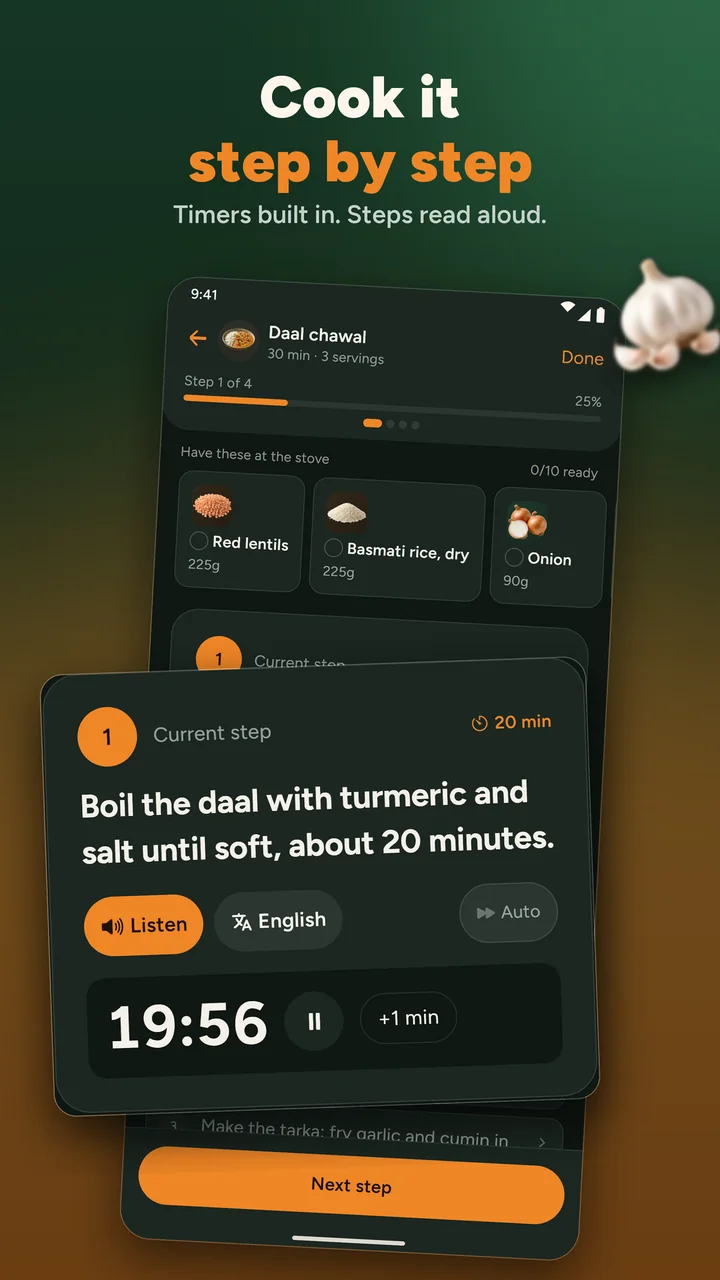
Cook it in the app
Timers, ingredients at the stove, steps read aloud
The app is coming to iPhone and Android. Until then, Tonight and every recipe page work in your browser.
- Coming soon to theApp StoreiPhone
- Coming soon to theGoogle PlayAndroid